Circle Coaster Mockup: Professional Product Photography Made Simple
Creating stunning product imagery no longer requires a photography studio or advanced technical skills. The Circle Coaster Mockup & Template provides designers and entrepreneurs with a straightforward solution for showcasing circular coaster designs in a realistic, professional context. This resource eliminates the guesswork from product presentation, allowing you to focus entirely on your creative work.
Understanding the Mockup's Core Features
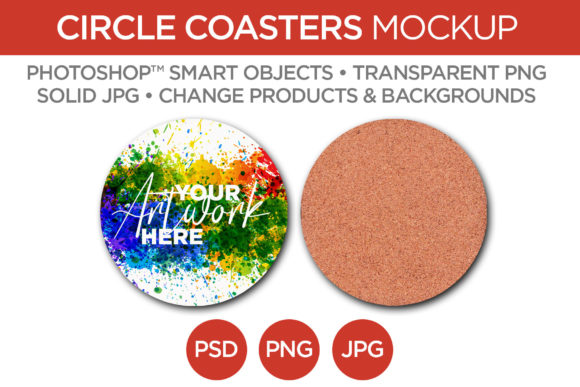
This particular set includes mockups of both cork and hardwood coasters, each precisely sized at 3.75 inches in diameter with a 0.125-inch thickness. The attention to detail in the textures and shadows gives the final images a tangible, authentic quality. You receive two distinct camera angles, providing variety for different layout needs. The files are delivered in multiple formats—PSD with Smart Objects, transparent PNG, and solid JPG—ensuring compatibility with your preferred workflow, whether that's Adobe Photoshop, Affinity Photo, or other layer-friendly software.
The true power lies in the Smart Object functionality within the PSD files. By simply double-clicking the designated layer, you can paste your artwork, save, and watch it perfectly conform to the coaster's surface, complete with accurate perspective and lighting. This non-destructive editing method means you can test dozens of designs in minutes, a process that would take hours to photograph manually.
Practical Applications for Your Business
For a small business owner selling custom coasters, this mockup is invaluable. Instead of investing in physical samples for every new design, you can present a full catalog online using these templates. A graphic designer can use them to create a compelling portfolio piece or a client presentation that feels polished and complete. Bloggers and content creators in the home decor or lifestyle space can generate unique imagery for articles about interior design or gift guides without needing to source physical products.
The versatility extends into marketing. Use the finished mockups for e-commerce listings, social media advertisements, email newsletter headers, or even printed lookbooks. The consistent, professional backdrop ensures your designs are the focal point, which is crucial for building a recognizable brand identity. When your product images look credible and high-quality, customer trust and perceived value increase significantly.
Integrating Mockups into Your Design Workflow
Effective use of a product mockup goes beyond a simple design swap. Consider the overall composition. The background layer is fully editable, allowing you to set a scene that aligns with your brand's aesthetic—whether that's a rustic wooden table for a farmhouse vibe or a clean marble surface for a modern look. Changing the coaster's color or texture, if your design allows, can further customize the final output.
Think about your end use. For a website banner, the 2000x2000 pixel dimension at 300 dpi provides ample resolution for crisp display on high-density screens. For social media, you might crop in tightly on one angle to highlight intricate design details. The layered structure means you can isolate elements, adjust shadows, or tweak highlights to match other brand assets, ensuring visual consistency across all your platforms.
Tips for Realistic and Effective Presentations
Always start with a high-resolution version of your artwork. Placing a low-quality image into the Smart Object will result in a blurry, unprofessional final mockup, regardless of the template's quality. Pay attention to scale; ensure your design's key elements aren't awkwardly cut off by the coaster's circular edge. Sometimes, a slight rotation within the Smart Object can create a more dynamic and natural placement.
Don't overlook the importance of context. While a standalone coaster image is clean, placing it in a scene with a coffee cup or a plant (using additional layers or separate images) can tell a story and help potential customers visualize the product in their own space. This approach is particularly powerful for brand storytelling and connecting with your audience on an emotional level.
Why a Quality Mockup is a Smart Investment
In a crowded digital marketplace, presentation is a key differentiator. A professional mockup like the Circle Coaster Mockup & Template acts as a bridge between your digital design file and a tangible product in the customer's mind. It demonstrates professionalism and attention to detail, qualities that reflect directly on your brand. For designers, it's a time-saving tool that elevates client work. For makers, it's a cost-effective way to test market reaction before committing to production runs.
Ultimately, this resource empowers you to present your work with the polish it deserves. It handles the complex technical aspects of product photography and lighting, freeing you to concentrate on what you do best: creating compelling designs. Whether you're building an online store, refreshing your portfolio, or creating marketing materials, having reliable, editable mockups in your toolkit is a practical step toward more effective and efficient creative work.