Elevate Your Brand with the 10 Business Outline Icons Bundle
In the fast-paced world of digital design, clarity and consistency are your most valuable assets. Whether you are building a mobile application, refining a corporate website, or crafting a pitch deck, visual communication needs to be instant and professional. The 10 Business Outline Icons Bundle is designed to bridge the gap between complex business concepts and user-friendly interfaces. This collection isn't just a random assortment of graphics; it is a curated set of design assets built to support modern brand identity and streamline the user experience. By integrating these visuals into your workflow, you can create a cohesive language that resonates with clients and users alike.
Anatomy of a Professional Icon Set
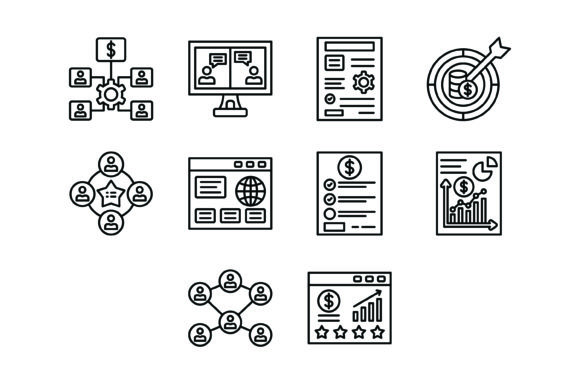
The strength of this bundle lies in its specificity and versatility. It includes ten distinct concepts essential for any business operation: Organization, Online Chat, Project Management, Target, Teamwork, Browser, Price List, Bar Chart, Connectivity, and Ratings. Visually, these icons embrace a clean, outline style. This aesthetic is currently dominating web design and mobile apps because it offers a lightweight, airy feel that doesn’t clutter the screen. Unlike heavy, filled icons that can weigh down a layout, outline icons allow the background color to show through, making the interface feel larger and more open.
Each icon is crafted as a 100% vector, ensuring that they remain crisp and legible whether displayed on a massive 4K monitor or a small smartphone screen. This scalability is crucial for editorial design and packaging design, where resolution requirements can vary wildly. The "Organization" icon, for instance, uses simple geometric shapes to suggest structure without overwhelming the viewer, while the "Online Chat" icon uses familiar speech bubble tropes to signal instant communication. This balance between familiarity and modern typography styling makes the set a powerful tool for visual storytelling.
Strategic Applications: From UI to Branding
Understanding where to deploy these assets is key to maximizing their value. For UI/UX designers, the 10 Business Outline Icons Bundle serves as a functional navigation tool. The "Project Management" and "Browser" icons are perfect for dashboard sidebars, helping users intuitively navigate complex software. When used in a mobile app, the "Connectivity" and "Teamwork" icons can guide users through onboarding processes or highlight key features within a settings menu.
For marketers and content creators, these icons elevate social media graphics and presentations. Imagine a slide deck discussing quarterly targets; using the "Target" or "Bar Chart" icon creates immediate visual hierarchy, drawing the eye to the most critical data points. In editorial design, such as blog posts or e-books, icons like "Ratings" and "Price List" can break up dense text, improving readability and keeping the reader engaged. They act as visual anchors, helping the audience scan content quickly to find the information they need.
Furthermore, small business owners can utilize these icons to strengthen their brand identity without the cost of custom illustration. Using the "Organization" icon on a letterhead or the "Teamwork" icon on a company t-shirt creates a unified look. Because the files are included in AI, EPS, JPG, PNG, and SVG formats, you have the flexibility to edit colors and strokes to match your specific brand palette perfectly.
Integrating Icons with Typography and Hierarchy
Icons rarely exist in a vacuum; they usually sit alongside text. Therefore, how the 10 Business Outline Icons Bundle interacts with your chosen typeface is vital. A common mistake in logo design and web layouts is pairing detailed icons with overly ornate fonts, such as a complex script font or a heavy handwritten font. This creates visual noise.
Because these icons are clean and geometric, they pair exceptionally well with sans serif fonts and modern serif fonts. For example, pairing the "Bar Chart" icon with a bold, sans-serif heading creates a strong, corporate feel suitable for financial reports. Conversely, using the "Ratings" icon next to a light, serif body text can add a touch of elegance to a restaurant menu or a product review page.
When implementing these icons, pay attention to visual weight. If you are using a premium font that has a very thick stroke (like a display font), you may need to increase the stroke weight of the SVG icons to ensure they don't look lost. Conversely, if your web design uses thin, minimalist typography, the default line weight of these icons will likely be a perfect match. The goal is to create a seamless flow where the icon supports the text rather than competing with it.
Technical Flexibility for Every Creator
One of the standout features of this bundle is the file format diversity. The inclusion of SVG (Scalable Vector Graphics) is particularly beneficial for web design. SVGs are code-based, meaning they load faster than image-based formats like JPGs and can be manipulated via CSS. You can change the color of an SVG icon on hover states or animate it to draw attention to a call-to-action button.
For print applications, the AI and EPS files ensure that your graphics remain vector-based, allowing you to scale them for large-format printing—such as trade show banners or posters—without any pixelation. The transparent PNGs are a lifesaver for hobbyists and crafters who might be using simpler software like Canva or PowerPoint, allowing them to drag and drop icons onto their designs instantly.
Whether you are a designer building a complex enterprise dashboard or a blogger looking to spruce up a sidebar, the 10 Business Outline Icons Bundle offers a practical, high-quality solution. It combines aesthetic appeal with technical robustness, ensuring your business communications look professional, organized, and engaging across every platform.